Showing posts with label spring mvc. Show all posts

Monday, October 8, 2012

Spring MVC, Security + Hibernate + DWR - Page 4


Spring MVC, Security + Hibernate + DWR, Let's PLay

OK, let's secure it ;)

The Spring security filter and Spring configuration:

in you web.xml edit the line to add a new file called spring-security.xml
<param-value>/WEB-INF/applicationContext.xml,/WEB-INF/dwr-context.xml,/WEB-INF/hibernate-context.xml,/WEB-INF/spring-security.xml</param-value>
<filter>
    <filter-name>springSecurityFilterChain</filter-name>
    <filter-class>
            org.springframework.web.filter.DelegatingFilterProxy
    </filter-class>
</filter>
<filter-mapping>
	<filter-name>springSecurityFilterChain</filter-name>
    <url-pattern>/*</url-pattern>
</filter-mapping>

Filter Order

as we are now having two filters (springSecurityFilterChain and OpenSessionInViewFilter) we need to set the filter order as, 1-security 2-Hibernate.
make sure you filter order look like this
<filter-mapping>
	<filter-name>springSecurityFilterChain</filter-name>
	<url-pattern>/*</url-pattern>
</filter-mapping>
<filter-mapping>
	<filter-name>hibernateFilter</filter-name>
	<url-pattern>/*</url-pattern>
</filter-mapping>

spring-security.xml

this file will configure spring security, we will use form authentication, the users will be configured using this file too.
<beans:beans xmlns="http://www.springframework.org/schema/security"
	xmlns:beans="http://www.springframework.org/schema/beans" 
	xmlns:xsi="http://www.w3.org/2001/XMLSchema-instance"
	xsi:schemaLocation="http://www.springframework.org/schema/beans
	http://www.springframework.org/schema/beans/spring-beans-3.0.xsd
	http://www.springframework.org/schema/security
	http://www.springframework.org/schema/security/spring-security-3.0.3.xsd">
 
	<http auto-config="true">
		<intercept-url pattern="/*" access="ROLE_USER" />
	</http>
 
	<authentication-manager>
	  <authentication-provider>
	    <user-service>
		<user name="mtz" password="123" authorities="ROLE_USER" />
	    </user-service>
	  </authentication-provider>
	</authentication-manager>
 
</beans:beans>
the idea here is that we are securing every URL, with:
username:mtz
password:123

Test it

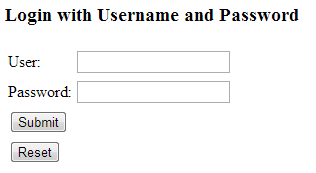
deploy the project and you should see the following page
and you are done, thanks :)
download the full example

Spring MVC, Security + Hibernate + DWR - Page 3


Spring MVC, Security + Hibernate + DWR, Let's PLay

OK, time for DWR ;)

the DWR servlet and Spring configuration:

in you web.xml edit the line to add a new file called dwr-context.xml
<param-value>/WEB-INF/applicationContext.xml,/WEB-INF/hibernate-context.xml,/WEB-INF/dwr-context.xml</param-value>
and add the DWR servlet and associate it with /dwr/* requests.
<servlet>
	<servlet-name>dwr</servlet-name>
	<servlet-class>org.directwebremoting.spring.DwrSpringServlet</servlet-class>
	<init-param>
		<param-name>debug</param-name>
		<param-value>true</param-value>
	</init-param>
</servlet>
<servlet-mapping>
	<servlet-name>dwr</servlet-name>
	<url-pattern>/dwr/*</url-pattern>
</servlet-mapping>

dwr-context.xml:

under /WEB-INF create a new file called dwr-context.xml, the file will configure the integration points between Spring and DWR.
<?xml version="1.0" encoding="UTF-8"?>
<beans xmlns="http://www.springframework.org/schema/beans"
       xmlns:xsi="http://www.w3.org/2001/XMLSchema-instance"
       xmlns:p="http://www.springframework.org/schema/p"
       xmlns:aop="http://www.springframework.org/schema/aop"
       xmlns:dwr="http://www.directwebremoting.org/schema/spring-dwr"
       xmlns:tx="http://www.springframework.org/schema/tx"
       xsi:schemaLocation="http://www.springframework.org/schema/beans http://www.springframework.org/schema/beans/spring-beans-3.0.xsd
       http://www.springframework.org/schema/aop http://www.springframework.org/schema/aop/spring-aop-3.0.xsd
       http://www.directwebremoting.org/schema/spring-dwr http://www.directwebremoting.org/schema/spring-dwr-3.0.xsd
       http://www.springframework.org/schema/tx http://www.springframework.org/schema/tx/spring-tx-3.0.xsd">

       <dwr:configuration />
       <dwr:annotation-config id="dwrAnnotationConfig"/>
       <dwr:annotation-scan base-package="com.mtz.spring.dto"/>

</beans>
this file defines three configurations:
1- a default dwr configuration: the default configurations is fine as we are relying mostly on annotatios.
2- annotation config: DWR will scan spring beans for certain annotations.
3- annotation scan: DWR will scan the class path for certain annotations.


simply, if you have service class and want this service to be exposed to dwr you have two options, either, create a spring bean or let dwr scan its path, both ways, those classes had to have certain annotations.

the User class

as the User is under the package com.mtz.spring.dto and no Spring beans were (and mostly will never) created from that class, we need DWR to scan the classes under this package.
the class has been mentioned before, what needs to be explained
@DataTransferObject: DWR will marshal and unmarshal this object using a certain converter, in our example it is type="hibernate3", converter=H3BeanConverter.class, also for each property you need on the javascript object you have to expose it using the annotation @RemoteProperty

DAO and Service

in the package com.mtz.spring.dao

create the interface UserDAO

package com.mtz.spring.dao;

import com.mtz.spring.dto.User;
import java.util.List;

/**
 *
 * @author salemmo
 */
public interface UserDAO {
    public User getUser(int id);
    public User addUser(User user);
    public User removeUser(User user);
    public List<User> getAllUsers();
}

in the package com.mtz.spring.dao

create the class UserDAOImpl

package com.mtz.spring.dao;

import com.mtz.spring.dto.User;

import java.util.List;
import org.hibernate.Session;
import org.hibernate.SessionFactory;

/**
 *
 * @author salemmo
 */
public class UserDAOImpl implements UserDAO{

    public User getUser(int id) {
        Session session = sessionFactory.getCurrentSession();
        User u = (User) session.get(User.class, id);
        return u;
    }

    public User addUser(User user) {
        Session session = sessionFactory.getCurrentSession();
        session.saveOrUpdate(user);
        return user;
    }

    public User removeUser(User user) {
        Session session = sessionFactory.getCurrentSession();
        session.delete(user);
        return user;
    }

    public List<User> getAllUsers() {
        Session session = sessionFactory.getCurrentSession();
        return session.createQuery("from User").list();
    }
    
    private SessionFactory sessionFactory;
    /**
     * @return the sessionFactory
     */
    public SessionFactory getSessionFactory() {
        return sessionFactory;
    }

    /**
     * @param sessionFactory the sessionFactory to set
     */
    public void setSessionFactory(SessionFactory sessionFactory) {
        this.sessionFactory = sessionFactory;
    }
    
}
in the package com.mtz.spring.service

create the interface UserService

package com.mtz.spring.service;

import com.mtz.spring.dto.User;
import java.util.List;

/**
 *
 * @author salemmo
 */
public interface UserService {
    public User getUser(int id);
    public User addUser(User user);
    public User removeUser(User user);
    public List<User> getAllUsers();
}
in the package com.mtz.spring.service

create the class UserServiceImpl

package com.mtz.spring.service;

import com.mtz.spring.dao.UserDAO;
import com.mtz.spring.dto.User;
import java.util.List;
import org.directwebremoting.annotations.RemoteMethod;
import org.directwebremoting.annotations.RemoteProxy;
import org.springframework.transaction.annotation.Transactional;

/**
 *
 * @author salemmo
 */
@RemoteProxy
public class UserServiceImpl implements UserService{

    
    @RemoteMethod
    @Transactional
    public User getUser(int id) {
        return getUserDAO().getUser(id);
    }

    @Transactional
    @RemoteMethod
    public User addUser(User user) {
        return getUserDAO().addUser(user);
    }
    
    @Transactional
    @RemoteMethod
    public User removeUser(User user) {
        return getUserDAO().removeUser(user);
    }

    @Transactional
    @RemoteMethod
    public List<User> getAllUsers() {
        return getUserDAO().getAllUsers();
    }
    
    private UserDAO userDAO;

    /**
     * @return the userDAO
     */
    public UserDAO getUserDAO() {
        return userDAO;
    }

    /**
     * @param userDAO the userDAO to set
     */
    public void setUserDAO(UserDAO userDAO) {
        this.userDAO = userDAO;
    }
    
}

the important things to know about the UserServiceImpl are the annotations.
@RemoteProxy: tells DWR that you want this service to be exposed.
@RemoteMethod: tells DWR that you want this method to be exposed.
@Transactional: tells hibernate that you want this method to run in transaction.

Wrap it up in the applicationContext.xml

edit your applicationContext.xml to add the service bean
<bean class="com.mtz.spring.dao.UserDAOImpl" id="userDAO">
	<property name="sessionFactory" ref="sessionFactory"/>
</bean>

<bean class="com.mtz.spring.service.UserServiceImpl" id="userService">
	<property name="userDAO" ref="userDAO"/>
</bean>

edit hello.jsp

edit /WEB-INF/jsp/hello.jsp to make use of DWR
<%@page contentType="text/html" pageEncoding="UTF-8"%>
<!DOCTYPE HTML PUBLIC "-//W3C//DTD HTML 4.01 Transitional//EN"
    "http://www.w3.org/TR/html4/loose.dtd">

	<%
		String contextPath=request.getContextPath();
	%>
	
<html>
    <head>
        <meta http-equiv="Content-Type" content="text/html; charset=UTF-8">
        <script type='text/javascript' src='<%=contextPath%>/dwr/engine.js'></script>
        <script type='text/javascript' src='<%=contextPath%>/dwr/interface/UserServiceImpl.js'></script>
        <script type='text/javascript' src='<%=contextPath%>/dwr/util.js'></script>
        <title>Welcome to Spring Web MVC project</title>
        <script type="text/javascript">
            function goGetit(){
                UserServiceImpl.getUser(document.getElementById("userid").value, {
                    callback:function(user) { 
                        document.getElementById("userage").value=user.age;
                        document.getElementById("username").value=user.name;
                    }
                });
            }
            
            function goSaveit(){
                var user= {
                    id: document.getElementById("userid").value,
                    age:document.getElementById("userage").value,
                    name:document.getElementById("username").value
                };
                UserServiceImpl.addUser(user, {
                    callback:function(user) { 
                        var useraction = (document.getElementById("userid").value=="")? "added":"altered";
                        document.getElementById("message").innerHTML = "User "+useraction+" with the ID: "+user.id;
                        getAllUsers();
                    }
                });
            }
            
            function goRemoveit(){
                var user= {
                    id: document.getElementById("userid").value
                };
                UserServiceImpl.removeUser(user, {
                    callback:function(user) { 
                        document.getElementById("userid").value="";
                        document.getElementById("userage").value="";
                        document.getElementById("username").value="";
                        document.getElementById("message").innerHTML = "User removed with the ID: "+user.id;
                        getAllUsers();
                    }
                });
            }
            
            function getAllUsers(){
                
                UserServiceImpl.getAllUsers({
                    callback:function(users) {
                        var cellFunctions = [
                            function(user) { return user.id; },
                            function(user) { return user.age; },
                            function(user) { return user.name; }
                        ];
                        dwr.util.removeAllRows("allusers");
                        dwr.util.addRows( "allusers", users, cellFunctions,{ escapeHtml:false });
                    }
                });
            }
        </script>
    </head>

    <body onload="getAllUsers()">
        <H2>Hello! This is the default welcome page for a Spring Web MVC project.</H2>
        <h3>${message}<h3/>
            <input type="text" id="userid"><input type="button" value="Get User By ID" onclick="goGetit();"/>
            <hr width="70%"/>
            <div id="message"> </div>
            <table>
                <tr>
                    <td>Age:</td>
                    <td><input type="text" id="userage"></td>
                </tr>
                <tr>
                    <td>Name:</td>
                    <td><input type="text" id="username"></td>
                </tr>
                <tr>
                    <td><input type="button" value="Add/Edit User" onclick="goSaveit();"/></td>
                    <td><input type="button" value="Remove User" onclick="goRemoveit();"/></td>
                </tr>
            </table>
            <hr width="70%"/>
            <table border="1">
                <thead>
                    <tr>
                        <th>ID</th>
                        <th>Age</th>
                        <th>Name</th>
                    </tr>
                </thead>
                <tbody id="allusers"> </tbody>
            </table>
    </body>
</html>

Test it

deploy the project and you should see the following page


Next - Configuring Spring Security
Sunday, October 7, 2012

Spring MVC, Security + Hibernate + DWR - Page 2


Spring MVC, Security + Hibernate + DWR, Let's PLay

OK, our Spring MVC should be working by now, let's add Hibernate ;)

create a table with the following specifications

MySQL table SQL script:


CREATE TABLE `user_` (
  `id` int(11) NOT NULL AUTO_INCREMENT,
  `age` int(11) DEFAULT NULL,
  `name` varchar(45) DEFAULT NULL,
  PRIMARY KEY (`id`)
) ENGINE=InnoDB AUTO_INCREMENT=3 DEFAULT CHARSET=utf8;

now, configure your spring context to load a new file called hibernate-context.xml. edit your web.xml to add the mentioned file
<param-value>/WEB-INF/applicationContext.xml,/WEB-INF/hibernate-context.xml</param-value>

hibernate-context.xml:

create a new file called hibernate-context.xml under /WEB-INF with the following content
<?xml version="1.0" encoding="UTF-8"?>
<beans xmlns="http://www.springframework.org/schema/beans"
	xmlns:xsi="http://www.w3.org/2001/XMLSchema-instance" xmlns:p="http://www.springframework.org/schema/p"
	xmlns:aop="http://www.springframework.org/schema/aop" xmlns:tx="http://www.springframework.org/schema/tx"
	xsi:schemaLocation="http://www.springframework.org/schema/beans http://www.springframework.org/schema/beans/spring-beans-3.0.xsd
       http://www.springframework.org/schema/aop http://www.springframework.org/schema/aop/spring-aop-3.0.xsd
       http://www.springframework.org/schema/tx http://www.springframework.org/schema/tx/spring-tx-3.0.xsd">

	<bean id="propertyConfigurer"
		class="org.springframework.beans.factory.config.PropertyPlaceholderConfigurer"
		p:location="/WEB-INF/jdbc.properties" />

	<bean id="dataSource"
		class="org.springframework.jdbc.datasource.DriverManagerDataSource"
		p:driverClassName="${jdbc.driverClassName}" p:url="${jdbc.url}"
		p:username="${jdbc.username}" p:password="${jdbc.password}" />

	<bean id="sessionFactory"
		class="org.springframework.orm.hibernate3.annotation.AnnotationSessionFactoryBean">

		<property name="dataSource">
			<ref bean="dataSource" />
		</property>

		<property name="hibernateProperties">
			<props>
				<prop key="hibernate.dialect">org.hibernate.dialect.MySQLDialect</prop>
				<prop key="hibernate.show_sql">true</prop>
			</props>
		</property>

		<property name="annotatedClasses">
			<list>
				<value>com.mtz.spring.dto.User</value>
			</list>
		</property>

	</bean>

	<bean id="transactionManager"
		class="org.springframework.orm.hibernate3.HibernateTransactionManager"
		p:sessionFactory-ref="sessionFactory" />

	<tx:annotation-driven />

</beans>
basically, this file defines the following:
propertyConfigurer: spring will look for a properties file called jdbc.properties to replace the place holders mentioned here which are related to the database connection arguments.
dataSource: the datasource object will be used by the Hibernate session factory to connect to the database.
sessionFactory: the session factory that will be used by Hibernate, and it defines an attribute called annotatedClasses which are Hibernate mapping objects
transactionManager: we define this bean so we can be able to do database queries in transactions. Transaction Annotations: we will configure transactions via annotations.
alternatively, you can configure the session factory to scan the class path
<property name="packagesToScan" value="com.mtz.spring.dto"/>

jdbc.properties:

under /WEB-INF create a new file named jdbc.properties with the following content, please edit for your test
jdbc.driverClassName=com.mysql.jdbc.Driver
jdbc.url=jdbc:mysql://localhost:3306/spring
jdbc.username=root
jdbc.password=root

the User class

under the package com.mtz.spring.dto create a file named User.java
package com.mtz.spring.dto;

import java.io.Serializable;
import javax.persistence.*;
import org.directwebremoting.annotations.DataTransferObject;
import org.directwebremoting.annotations.RemoteProperty;
import org.directwebremoting.hibernate.H3BeanConverter;
/**
 *
 * @author salemmo
 */
@DataTransferObject(type="hibernate3", converter=H3BeanConverter.class)
@Entity
@Table(name="user_", catalog="spring")
public class User implements Serializable{
    @RemoteProperty
    private String name;
    @RemoteProperty
    private int age;
    @RemoteProperty
    private int id;

    /**
     * @return the name
     */
    @Column(name="name")
    public String getName() {
        return name;
    }

    /**
     * @param name the name to set
     */
    public void setName(String name) {
        this.name = name;
    }

    /**
     * @return the age
     */
    @Column(name="age")
    public int getAge() {
        return age;
    }

    /**
     * @param age the age to set
     */
    public void setAge(int age) {
        this.age = age;
    }

    /**
     * @return the id
     */
    @Id
    @GeneratedValue(strategy=javax.persistence.GenerationType.IDENTITY)
    @Column(name="id")
    public int getId() {
        return id;
    }

    /**
     * @param id the id to set
     */
    public void setId(int id) {
        this.id = id;
    }
}
here we define the mapping between this class and the database table using the annotations @Entity, @Table @Column and ID specific annotations (don't give so much attention to the @DataTransferObject and @RemoteProperty as they will be used by DWR later on)

OpenSssionInView Filter

we don't want to open session manually and maybe forget to close them, can we do it automatically? also, i have a lazy initialized property can't use it in my JSPs because the object sent to the view was de-attached from the Hibernate context. Well, Hibernate has a Filter called OpenSssionInView Filter that will solve both problems, and indeed, Spring has wrapped this filter. to enable this filter edit your web.xml to add
<filter>
	<filter-name>hibernateFilter</filter-name>
	<filter-class>
		org.springframework.orm.hibernate3.support.OpenSessionInViewFilter
	</filter-class>
	<init-param>
		<param-name>sessionFactoryBeanName</param-name>
		<param-value>sessionFactory</param-value>
	</init-param>
</filter>

<filter-mapping>
	<filter-name>hibernateFilter</filter-name>
	<url-pattern>/*</url-pattern>
</filter-mapping>
of course the filter needs one session factory to create sessions.

Test it

no changes are expected, still we see our page, however, make sure that you did it right by not seeing any exceptions in the logs.

Next - Configuring DWR

Spring MVC, Security + Hibernate + DWR - Page 1


Spring MVC, Security + Hibernate + DWR, Let's PLay

OK, that is a lot, but it was fun getting those guys working together in harmony ;)

Why?
Spring has proven to be a solid playground and a unique platform, here how the parts will act:
So, first things first, Maven, all the artifacts(shiny name for a jar/war files) that are required in in this example relies on Maven, all but dwr, by the time of writing this blog, "At the time of our last development build (3.0 RC2) we did not have a process in place to upload artifacts to Maven Central", the dwr site says.
This issue is easy to fix, we will install dwr.jar manually to our local repository, even better, if you are using archiva; upload the artifact.
mvn install:install-file -Dfile=path/to/dwr.jar -DgroupId=org.directwebremoting -DartifactId=dwr -Dversion=3.0RC2 -Dpackaging=jar
By now we can go ahead and create a new project using maven archetype.
mvn archetype:generate
we will start with a plain java web archetype, choose maven-archetype-webapp or number 224 as per my Maven, i ended up with those parameters
groupId: com.mtz.spring
artifactId: SpringHibernateDWR
version: 1.0.0
package: com.mtz.spring

Enable Java web 2.5 specifications:

edit /WEB-INF/web.xml
<!DOCTYPE web-app PUBLIC
 "-//Sun Microsystems, Inc.//DTD Web Application 2.3//EN"
 "http://java.sun.com/dtd/web-app_2_3.dtd" >

<web-app xmlns:xsi="http://www.w3.org/2001/XMLSchema-instance" xmlns="http://java.sun.com/xml/ns/javaee" xmlns:web="http://java.sun.com/xml/ns/javaee/web-app_2_5.xsd" xsi:schemaLocation="http://java.sun.com/xml/ns/javaee http://java.sun.com/xml/ns/javaee/web-app_2_5.xsd" version="2.5">

Maven Dependencies:

edit the pom.xml to include the following dependencies
<dependency>
 <groupId>junit</groupId>
 <artifactId>junit</artifactId>
 <version>3.8.1</version>
 <scope>test</scope>
</dependency>

<dependency>
 <groupId>log4j</groupId>
 <artifactId>log4j</artifactId>
 <version>1.2.17</version>
</dependency>

<!--Spring-->
<dependency>
 <groupId>org.springframework</groupId>
 <artifactId>spring-orm</artifactId>
 <version>3.0.6.RELEASE</version>
</dependency>
<dependency>
 <groupId>org.springframework</groupId>
 <artifactId>spring-web</artifactId>
 <version>3.0.6.RELEASE</version>
</dependency>
<dependency>
 <groupId>org.springframework</groupId>
 <artifactId>spring-webmvc</artifactId>
 <version>3.0.6.RELEASE</version>
</dependency>
<!--End Spring-->

<!--Spring Security-->
<dependency>
 <groupId>org.springframework.security</groupId>
 <artifactId>spring-security-core</artifactId>
 <version>3.0.7.RELEASE</version>
</dependency> 
<dependency>
 <groupId>org.springframework.security</groupId>
 <artifactId>spring-security-web</artifactId>
 <version>3.0.7.RELEASE</version>
</dependency> 
<dependency>
 <groupId>org.springframework.security</groupId>
 <artifactId>spring-security-config</artifactId>
 <version>3.0.7.RELEASE</version>
</dependency>
<!--End Spring Security-->

<!-- MySQL database driver -->
<dependency>
 <groupId>mysql</groupId>
 <artifactId>mysql-connector-java</artifactId>
 <version>5.1.9</version>
</dependency>
<!-- End MySQL-->

<!--DWR-->
<dependency>
 <groupId>org.directwebremoting</groupId>
 <artifactId>dwr</artifactId>
 <version>3.0RC2</version>
 <type>jar</type>
</dependency>
<!--End DWR-->

<!-- Hibernate framework -->
<dependency>
 <groupId>org.hibernate</groupId>
 <artifactId>hibernate-core</artifactId>
 <version>3.6.10.Final</version>
</dependency>
<dependency>
 <groupId>org.hibernate</groupId>
 <artifactId>hibernate-ehcache</artifactId>
 <version>3.6.10.Final</version>
</dependency>
<dependency>
 <groupId>javassist</groupId>
 <artifactId>javassist</artifactId>
 <version>3.12.1.GA</version>
</dependency>
<!-- Hibernate library dependecy end -->

<!-- apache commons -->
<dependency>
 <groupId>commons-logging</groupId>
 <artifactId>commons-logging</artifactId>
 <version>1.1.1</version>
</dependency>
<!-- end apache commons -->
under the resources directory create two files.
log4j.properties
# Root logger option
log4j.rootLogger=DEBUG, stdout
 
# Direct log messages to stdout
log4j.appender.stdout=org.apache.log4j.ConsoleAppender
log4j.appender.stdout.Target=System.out
log4j.appender.stdout.layout=org.apache.log4j.PatternLayout
log4j.appender.stdout.layout.ConversionPattern=%d{ABSOLUTE} %5p %c{1}:%L - %m%n
logging.properties
org.apache.catalina.core.ContainerBase.[Catalina].level = DEBUG
org.apache.catalina.core.ContainerBase.[Catalina].handlers = java.util.logging.ConsoleHandler
i wanted to see a lot of loggings, so i set both to DEBUG
now build your project with maven and make sure everything is OK.
mvn clean package

Spring MVC:

in your web.xml add
  <context-param>
 <param-name>contextConfigLocation</param-name>
 <param-value>/WEB-INF/applicationContext.xml</param-value>
</context-param>
<listener>
 <listener-class>org.springframework.web.context.ContextLoaderListener</listener-class>
</listener>
<servlet>
 <servlet-name>spring</servlet-name>
 <servlet-class>org.springframework.web.servlet.DispatcherServlet</servlet-class>
 <init-param>
  <param-name>contextConfigLocation</param-name>
  <param-value>/WEB-INF/spring-mvc.xml</param-value>
 </init-param>
 <load-on-startup>2</load-on-startup>
</servlet>
<servlet-mapping>
 <servlet-name>spring</servlet-name>
 <url-pattern>*.html</url-pattern>
</servlet-mapping>
<welcome-file-list>
	<welcome-file>redirect.jsp</welcome-file>
</welcome-file-list>
this is basically,
1- initializing the the Spring context using ContextLoaderListener which will look for a file named applicationContext.xml under WEB-INF.
2- loads the Spring MVC dispatcher servlet, the dispatcher will look for a file named spring-mvc.xml under WEB-INF and it also associate *.html requests to it.
3- the container will use redirect.jsp as the default landing page.

applicationContext.xml

we will just create a bean-less file that will be used later on, create the file under /WEB-INF
<?xml version="1.0" encoding="UTF-8"?>
<beans xmlns="http://www.springframework.org/schema/beans"
       xmlns:xsi="http://www.w3.org/2001/XMLSchema-instance"
       xmlns:p="http://www.springframework.org/schema/p"
       xmlns:aop="http://www.springframework.org/schema/aop"
       xmlns:tx="http://www.springframework.org/schema/tx"
       xsi:schemaLocation="http://www.springframework.org/schema/beans http://www.springframework.org/schema/beans/spring-beans-3.0.xsd
       http://www.springframework.org/schema/aop http://www.springframework.org/schema/aop/spring-aop-3.0.xsd
       http://www.springframework.org/schema/tx http://www.springframework.org/schema/tx/spring-tx-3.0.xsd">


</beans>

spring-mvc.xml

create a file with that name under /WEB-INF with the following content
<?xml version="1.0" encoding="UTF-8"?>
<beans xmlns="http://www.springframework.org/schema/beans"
       xmlns:xsi="http://www.w3.org/2001/XMLSchema-instance"
       xmlns:p="http://www.springframework.org/schema/p"
       xmlns:aop="http://www.springframework.org/schema/aop"
       xmlns:context="http://www.springframework.org/schema/context"
       xmlns:tx="http://www.springframework.org/schema/tx"
       xsi:schemaLocation="http://www.springframework.org/schema/beans http://www.springframework.org/schema/beans/spring-beans-3.0.xsd
       http://www.springframework.org/schema/aop http://www.springframework.org/schema/aop/spring-aop-3.0.xsd
       http://www.springframework.org/schema/context http://www.springframework.org/schema/context/spring-context-3.0.xsd
       http://www.springframework.org/schema/tx http://www.springframework.org/schema/tx/spring-tx-3.0.xsd">

    <context:component-scan base-package="com.mtz.spring.mvc.controller"/>

    <bean id="viewResolver"
          class="org.springframework.web.servlet.view.InternalResourceViewResolver"
          p:prefix="/WEB-INF/jsp/"
          p:suffix=".jsp" />

</beans>


this file configures Spring MVC to
1-Look for classes annotated with @controller in any class under com.mtz.spring.mvc.controller package.
2-add a basic view resolver that will map strings returned from the controller to a jsp file.

HelloController.java

under the package com.mtz.spring.mvc.controller create a new class called HelloController with the following content
package com.mtz.spring.mvc.controller;

import org.springframework.stereotype.Controller;
import org.springframework.ui.ModelMap;
import org.springframework.web.bind.annotation.RequestMapping;
import org.springframework.web.bind.annotation.RequestMethod;
 
@Controller
@RequestMapping("/welcome")
public class HelloController {
 
 @RequestMapping(method = RequestMethod.GET)
 public String printWelcome(ModelMap model) {
 
  model.addAttribute("message", "Spring + Hibernate + DWR, Hello World");
  return "hello";
 
 }
 
}
here, Spring MVC will bind /welcome.html requests to be handled by this controller, the controller will return its view name which is "hello" then the view resolver will map it to /WEB-INF/jsp/hello.jsp

hello.jsp

under /WEB-INF create a directory named jsp and then create a jsp file called hello.jsp with the following content
<%@page contentType="text/html" pageEncoding="UTF-8"%>

Hello! This is the default welcome page for a Spring Web MVC project.

Message: ${message}

this jsp will print the message that was sent from the controller.

redirect.jsp

create a new jsp under webapp directory with the following content
<%@page contentType="text/html" pageEncoding="UTF-8"%>
<% response.sendRedirect("welcome.html"); %>
the redirect.jsp will redirect the requests from / to /welcome.html which will trigger the Spring MVC controller to work.

Test it

now package your project and deploy it, navigate to http://localhost:8080/SpringHibernateDWR/, if everything is correct, you should see this page.


Next - Configuring Hibernate